 繁體中文
繁體中文
 Azərbaycan
 Čeština
 English
 Español
 Français
 Ελληνικά
 हिन्दी
 Indonesia
 Italiano
 Português
 Русский (др. страны)
 Русский (Россия)
 Türkçe
 Українська
 العربية
 简体中文
简体中文
 日本語
日本語
 한국어
한국어
 Қазақ
Қазақ
You can add a photo and a cover image to make your phone number page recognizable in NumBuster. Unique branding increases trust and makes the page more informative for other users.
How to Set a Photo
- Open the NumBuster app and go to the Profile tab
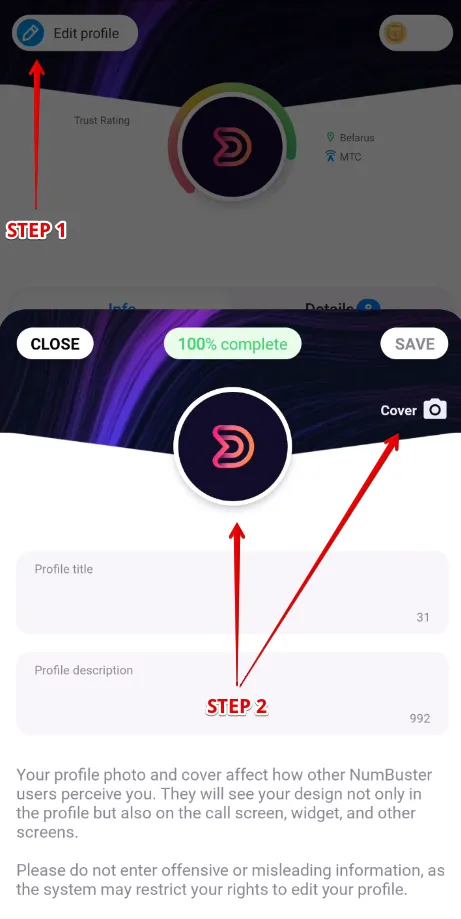
- Tap the Edit profile button in the top left corner of the screen
- Tap the photo field to select an image from your device’s gallery
How to Set a Cover Image
- Open the NumBuster app and go to the Profile tab
- Tap the Edit profile button in the top left corner of the screen
- Tap the cover field and select an image from your device’s gallery
 功能
功能


 Tariffs
 說明
說明