 Қазақ
Қазақ
 Azərbaycan
 Čeština
 English
 Español
 Français
 Ελληνικά
 हिन्दी
 Indonesia
 Italiano
 Português
 Русский (др. страны)
 Русский (Россия)
 Türkçe
 Українська
 العربية
 简体中文
简体中文
 繁體中文
繁體中文
 日本語
日本語
 한국어
한국어
Personalize the NumBuster interface, including the global theme and call screen color schemes.
How to Set Up the Call Color Theme
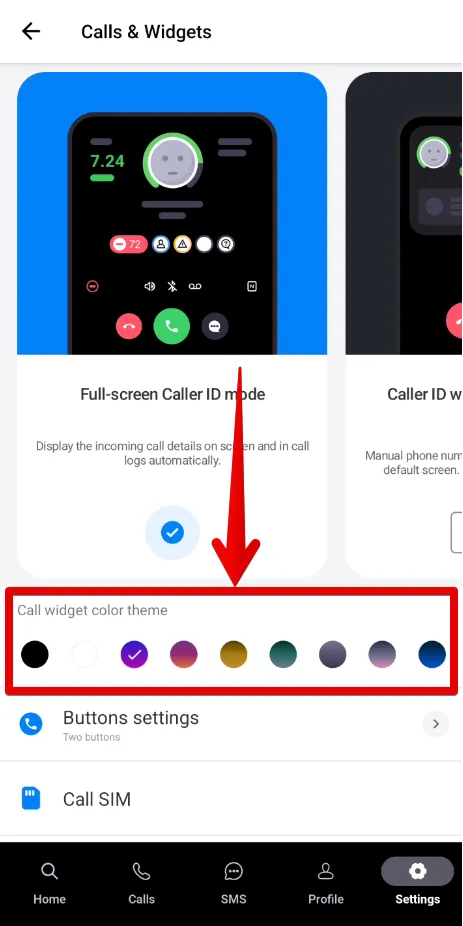
Modify the color scheme for the widget or full-screen caller ID.
- Go to Settings on the home screen in NumBuster
- Select Calls and widgets
- Choose your preferred color scheme in the Call widget color theme block
How to Set Up the App Theme
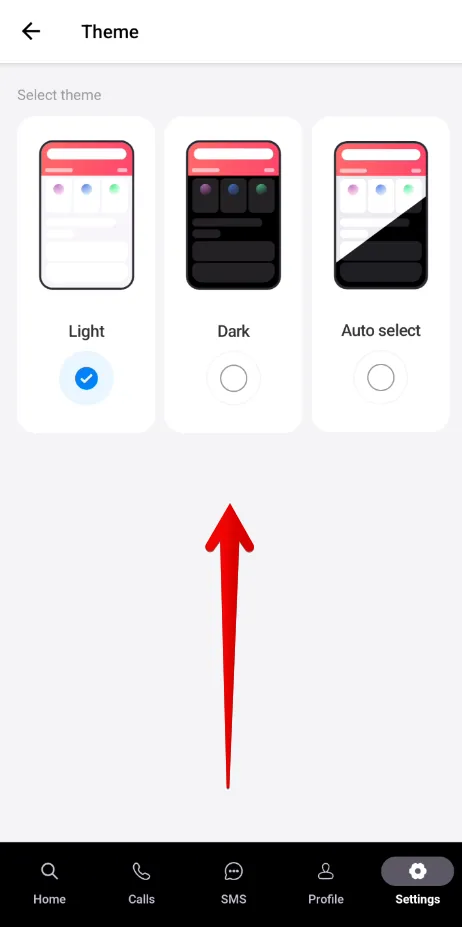
Change the overall color scheme (e.g., light or dark) in the app.
- Go to Settings on the home screen
- Select App Theme
- Pick your preferred option
 Функциялар


 Tariffs
 Анықтама