 Italiano
 Azərbaycan
 Čeština
 English
 Español
 Français
 Ελληνικά
 हिन्दी
 Indonesia
 Português
 Русский (др. страны)
 Русский (Россия)
 Türkçe
 Українська
 العربية
 简体中文
简体中文
 繁體中文
繁體中文
 日本語
日本語
 한국어
한국어
 Қазақ
Қазақ
NumBuster users can leave comments on a phone number page to share their personal experiences. Sometimes these reviews may be inaccurate or unfair. If you believe a comment violates the service rules, it can be removed.
How to Delete a Comment
- Tap the Hide button or the ! icon next to the text
- Submit a report regarding the text on the phone number profile using the Hide button
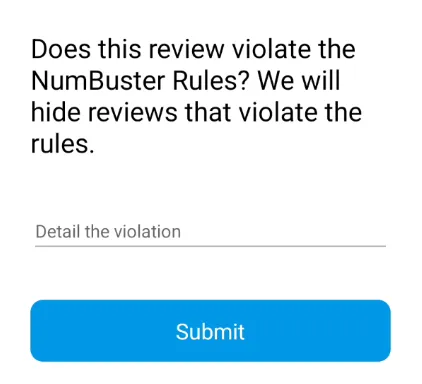
- Moderators will review the request and delete the text if it violates NumBuster rules or language standards
If a comment or its details do not violate the rules, they will remain on the phone number page.
You can also delete your own comment by tapping the trash icon. The review is removed immediately without moderation in this case.
❗ Please do not abuse the deletion feature for constructive comments or user blocks—this may negatively affect your in-app rating. Try responding to a negative review instead; the author might change their mind.
How to Reply to a Comment
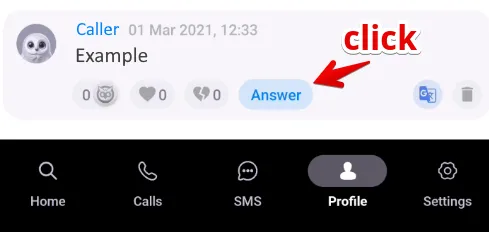
If you disagree with a review’s content but it doesn’t violate any rules, you can reply to the author. Tap the Reply button next to the comment to start a dialogue. Your response will be visible to other users and will help clarify the situation or provide context.
Block Counter
The phone number page displays a block counter. It shows how many NumBuster users have added the phone number to their blacklist. This value may change if a user removes the block on their device.
Important: You cannot delete or edit actions by other users that are not associated with reviews—such as emotags or the number’s block counter.
 Funzioni


 Tariffs
 Aiuto
Aiuto